Claude AI Prompts: The Complete Guide to Unlocking the Full Potential of Anthropic's Assistant
Claude, developed by Anthropic, has established itself as one of the most powerful AI assistants on the market. With its 200,000-token context window, deep analysis capabilities, and unique approach to AI safety, Claude offers possibilities that other models simply cannot match. But to get the most out of it, you need to understand its unique features and adapt your prompts accordingly. In this complete guide, you will discover how to craft optimized prompts for Claude, with practical examples and techniques exclusive to this exceptional assistant.
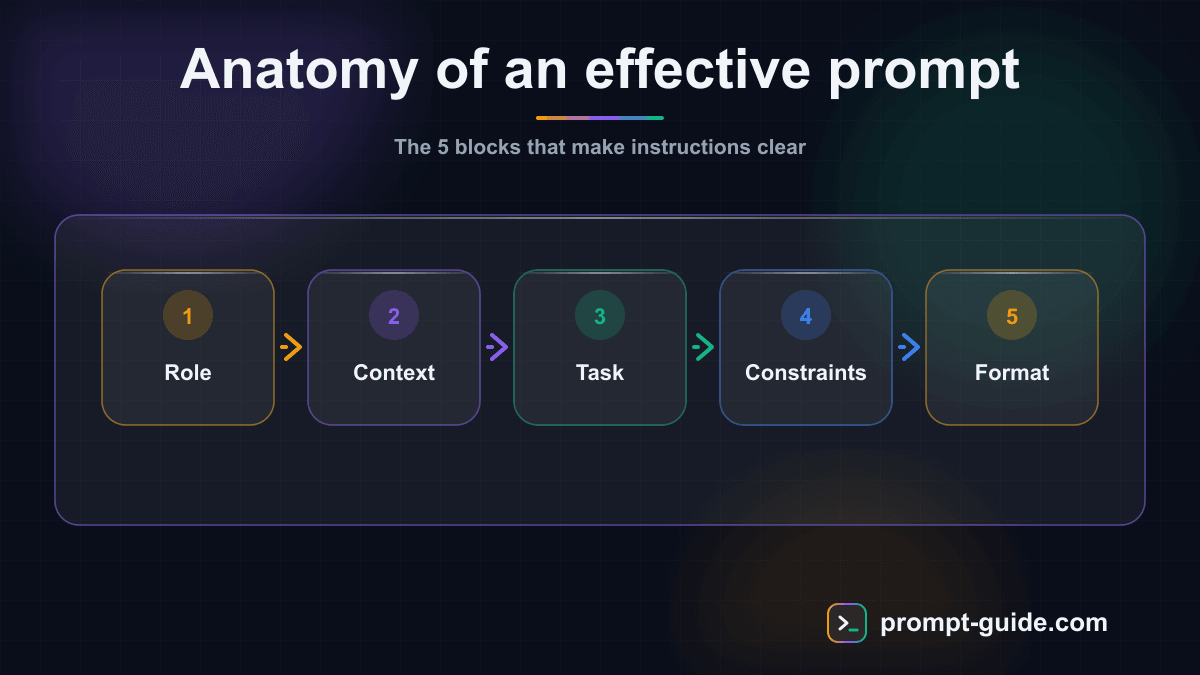
8 Best Practices for Prompting Claude Like a Pro
After hundreds of hours of intensive use with Claude, here are the best practices that consistently make the difference between a decent result and an exceptional one.
- Structure your prompts with XML tags (
, , , ). Claude is trained to recognize and use these tags, which significantly improves response quality and information separation. - Provide all available context. The 200K token window exists for a reason: Claude performs better when it understands the full picture. Never hesitate to provide too much information — Claude will extract what is relevant.
- Request Artifacts for concrete deliverables. Code, documents, tables, web pages: Artifacts are editable, shareable, and offer a superior experience compared to text in the chat.
- Use Projects for recurring work. Load your reference documents, style guide, and specifications into a Project, and every conversation will automatically benefit from that context.
- Be direct in your instructions. Claude does not need polite formulas to perform well. 'Analyze this text and identify 3 weaknesses' is more effective than 'Would it be possible to kindly analyze this text?'.
- Ask Claude to think out loud for complex problems. 'Before answering, analyze the problem step by step and present your reasoning' yields significantly better results on analytical tasks.
- Iterate with precision: instead of 'improve your response,' say exactly what is missing: 'Add concrete numbers to paragraph 2 and shorten the conclusion by half.' Claude follows revision instructions with remarkable accuracy.
- Leverage Claude's ability to handle long, detailed instructions. Unlike other models that get lost in lengthy prompts, Claude faithfully follows complex specifications with multiple constraints and requirements.
Ideal Use Cases for Claude
Certain tasks are particularly well-suited to Claude thanks to its technical specifications and unique capabilities. Here are the scenarios where Claude consistently outperforms other options.
- Document Analysis and Synthesis — Annual reports, legal contracts, technical documentation, research papers: Claude can ingest hundreds of pages and produce accurate summaries, comparisons, and recommendations. Its massive context window and fine-grained understanding make it the ideal tool for knowledge work.
- Long-Form Professional Writing — In-depth articles, white papers, product documentation, training manuals: Claude maintains remarkable consistency across long texts, rigorously follows style guides, and produces nuanced content that does not sound robotic. Ideal for content where writing quality is essential.
- Development and Code — From building complete applications in Artifacts to detailed code reviews, Claude is a top-tier development partner. It understands complex architectures, suggests appropriate patterns, and produces clean, well-structured code. Its Claude Code tool (command-line interface) even enables autonomous feature development.
- Strategic Decision Support — Claude excels at multi-criteria analysis, presenting arguments for and against, risk assessment, and formulating nuanced recommendations. Its honest approach and natural tendency to present multiple perspectives make it a trusted strategic advisor.
- Education and Training — Whether creating educational content, explaining complex concepts in accessible terms, or designing progressive exercises, Claude naturally adapts its language level and teaching approach. It is patient, structured in its explanations, and able to adapt to the learner's level.
- Unstructured Data Processing — Emails, customer feedback, interview transcripts, meeting notes: Claude efficiently transforms raw, messy data into structured, actionable information. Its ability to understand context and nuances makes it superior for this type of task.
Claude vs ChatGPT: When to Use Which?
Claude and ChatGPT are both excellent AI assistants, but they have different strengths. Understanding these differences helps you choose the right tool for each task and adapt your prompts accordingly.
- Claude Excels At... — Analyzing long documents (200K tokens vs 128K for ChatGPT). Tasks requiring nuance and honesty (Claude more readily acknowledges its limitations). Long-form, structured writing (articles, reports, documentation). Precise adherence to complex, detailed instructions. Working with code and creating interactive Artifacts. Long-term projects with persistent context.
- ChatGPT Excels At... — Real-time web browsing and news search. Image generation with DALL-E 3. Python code execution (Code Interpreter). Plugin ecosystem and custom GPTs. Multimodal tasks (image analysis, audio). Larger community and resource base.
- Adapting Your Prompts — For Claude: provide extensive context, use XML tags, be direct, request Artifacts. For ChatGPT: use detailed roles, leverage Custom Instructions, request web browsing for current data, use Code Interpreter for calculations. Short prompts work better with ChatGPT, while Claude prefers rich, structured prompts.
- The Best of Both Worlds — Advanced users leverage both tools in a complementary way. Claude for deep analysis, writing, and code. ChatGPT for web search, images, and quick tasks. Start a project with Claude's analysis, then use ChatGPT for news research, and return to Claude for the final draft. This hybrid approach maximizes the quality of your results.
Optimized Prompt Examples for Claude
Here are prompts specifically designed to leverage Claude's strengths. Each example takes advantage of one or more unique features of Anthropic's assistant.
- Long Document Analysis — Prompt: 'Here is an 80-page annual report [paste the document]. Analyze this report and produce: 1) A 500-word executive summary, 2) The 5 key figures to remember, 3) The 3 main risks identified, 4) The 3 growth opportunities, 5) A comparison with industry trends. Present each section with a clear heading and bullet points.' — This prompt leverages Claude's 200K token window to analyze documents that other models cannot process.
- Writing with a Style Guide — Prompt: '
Tone: professional but accessible. Short sentences (max 20 words). No jargon. Use formal address. Structure: catchy introduction, 3 parts, actionable conclusion. Blog post for a B2B SaaS startup targeting HR directors. Write a 1,200-word article on "How AI Is Transforming Recruitment in 2026." Include 3 concrete examples from real companies. ' — XML tags help Claude clearly separate the different parts of the prompt. - Code with Artifact — Prompt: 'Create an Artifact with a React (TypeScript) to-do list application. Features: add/delete/edit tasks, filter by status (all/active/completed), localStorage persistence, modern design with Tailwind CSS. Include smooth transition animations. The code should be clean, type-safe, and well-commented.' — Claude will generate the complete application in an interactive Artifact that you can test immediately.
- Multi-Perspective Analysis — Prompt: 'I need to decide whether my company (SME of 50 people, logistics sector) should invest 100K EUR in an AI solution to optimize our delivery routes. Analyze this decision from 4 angles: 1) Financial: ROI, payback period, hidden costs. 2) Operational: impact on teams, learning curve, transition risks. 3) Strategic: competitive advantage, market positioning, scalability. 4) Human: impact on employees, change management, training. For each angle, assign a risk score (1-5) and a recommendation. Conclude with a synthesis and your reasoned final recommendation.' — This prompt leverages Claude's ability to provide nuanced, multi-faceted analyses.
- Text Review and Critique — Prompt: 'You are a senior editor with 20 years of experience. Here is my text: [paste the text]. Review it following these steps: 1) Identify the 3 main strengths of the text, 2) List the 5 priority areas for improvement with concrete suggestions, 3) Rewrite the weak passages while maintaining my voice, 4) Check the logical consistency of the argument, 5) Suggest an alternative title and hook. Be direct and constructive in your critique.' — Claude excels at review thanks to its fine understanding of nuances and ability to maintain the author's style.
- Structured Data Extraction — Prompt: 'Here are 15 prospect emails received this week [paste the emails]. For each email, extract in table format: 1) Contact name, 2) Company, 3) Expressed need (one sentence), 4) Urgency level (low/medium/high), 5) Mentioned budget (if applicable), 6) Recommended next action. Sort by urgency level in descending order. Add a 3-line summary of the trends observed in these requests.' — Claude's context window allows processing large volumes of data in a single query.
Claude's Limitations to Be Aware Of
As powerful as it is, Claude has limitations that are important to know in order to use it optimally and avoid frustration.
- No web browsing: unlike ChatGPT, Claude cannot access the internet to verify information or search for real-time data. For current events, verify information from other sources.
- No image generation: Claude cannot create images (no DALL-E equivalent). For image generation, use ChatGPT, Midjourney, or DALL-E directly.
- Usage limits on the free version: Claude's free version has daily message limits that can be reached quickly with intensive use. The Pro subscription ($20/month) significantly increases these limits.
- Knowledge with a cutoff date: like any language model, Claude's knowledge has a cutoff date. It may not be aware of very recent events. Provide current information in your prompt if needed.
- Excessive caution on certain topics: Anthropic's safety-focused approach means Claude can sometimes be overly cautious in its responses on sensitive topics, even when the request is perfectly legitimate. Specify the professional or educational context of your request.
- No native code execution: Claude cannot execute Python code like ChatGPT does with Code Interpreter. It can write code and create interactive Artifacts (HTML/JS/React), but cannot run backend scripts.
How to Optimize Your Prompts for Claude: 7 Key Techniques
Claude has its own preferences when it comes to prompts. Here are the specific techniques that maximize the quality of its responses, based on Anthropic's official documentation and thousands of practical tests.
Provide Abundant Context
Unlike other models where you need to be concise, Claude performs better when you give it extensive context. Its 200K token window is there for that purpose. Do not hesitate to paste entire documents, emails, specifications, and previous examples. The more Claude understands your situation, the more relevant and tailored its response will be. For example, instead of 'write a follow-up email,' paste the original email, the client relationship history, and your objectives.
Use Structured Instructions with XML
Claude responds particularly well to prompts structured with XML tags. Use tags like
Be Direct and Explicit
Claude does not need excessive politeness or hedging. Get straight to the point: 'Analyze this document and identify the 5 main risks' is more effective than 'Could you please, if possible, take a look at this document and maybe tell me what you think?'. Claude prefers clarity over courtesy, and direct instructions produce better results.
Leverage Step-by-Step Thinking
Ask Claude to reason before concluding. The phrase 'Think step by step before giving your final answer' or 'Think out loud' significantly improves reasoning quality on complex problems. Claude is naturally strong at reasoning, and this technique amplifies its analytical capabilities. For mathematical or logical problems, this approach is virtually essential.
Provide Quality Examples
Claude learns very effectively from examples (few-shot learning). Provide 2-3 examples of the format and style you expect, and Claude will reproduce that pattern faithfully. Examples are particularly useful for classification, reformulation, and generation tasks with a specific format.
Use Projects for Recurring Context
If you regularly work on the same topic, create a Claude Project with your system instructions, style guide, and reference documents. Each new conversation will automatically inherit this context, eliminating the need to repeat the same information. It is like having an assistant that already knows your company and preferences.
Request Artifacts for Deliverables
For any concrete deliverable (code, document, table, presentation, web page), explicitly request an Artifact. 'Create an Artifact with...' or 'Generate an HTML page as an Artifact.' Artifacts are editable, shareable, and offer a much better experience than text in the chat for long or structured content.
Claude: Who Is Anthropic's AI Assistant?
Claude is an AI assistant developed by Anthropic, a company founded in 2021 by former OpenAI researchers, including Dario and Daniela Amodei. Anthropic stands out for its safety-centered approach to AI, with pioneering work on Constitutional AI that guides Claude's behavior. The model is available in several versions: Claude Sonnet (fast and versatile), Claude Opus (the most intelligent and nuanced), and Claude Haiku (ultra-fast for simple tasks). Claude is accessible for free on claude.ai with usage limits, and through the Claude Pro subscription ($20/month) for extended access.
- Claude Opus (The Most Advanced) — Anthropic's flagship model. Expert-level reasoning, fine understanding of nuances, excellent for complex analyses, long-form writing, and tasks that require deep thinking. Available with Claude Pro. Ideal when quality takes priority over speed.
- Claude Sonnet (Versatile) — The perfect balance between intelligence and speed. Excellent for the majority of daily tasks: writing, analysis, code, brainstorming. Available in the free version with limits. The default choice for most users.
- Claude Haiku (Ultra-Fast) — Anthropic's fastest and most cost-effective model. Perfect for simple and repetitive tasks: classification, data extraction, short answers, automation. Near-instant response time, ideal for high-throughput applications.
- Claude Pro ($20/month) — The Pro subscription provides extended access to all models, priority during peak hours, early access to new features, and significantly higher usage limits. Essential for daily professional use.
Claude's Unique Features: What Sets It Apart
Claude possesses several unique characteristics that directly influence how you should craft your prompts. Understanding these features is the key to achieving superior results.
- 200K Token Context Window — The largest context window on the market. Claude can analyze an entire book, hundreds of pages of documentation, or complete files in a single conversation. This means you can provide an enormous amount of context in your prompts — and Claude excels when given a lot of information to process. Unlike other models that get lost in long texts, Claude maintains coherent understanding across the entire document.
- Artifacts: Interactive Document Creation — A feature exclusive to Claude: Artifacts allow you to generate documents, code, web pages, SVGs, and visualizations in a separate panel that is directly editable. You can ask Claude to build a React application, an interactive chart, or a structured document, and see it appear instantly alongside the conversation. This fundamentally changes how you work with AI.
- Projects: Persistent Context — Claude Projects let you create a workspace with system instructions and reference files that persist between conversations. You can upload your style guide, technical specifications, and reference data, and Claude will automatically use them in every new conversation within the project. Ideal for teams and long-term projects.
- Honesty and Nuance — Claude is designed to be honest and acknowledge its limitations. Rather than fabricating answers, it will prefer to say when it is unsure, present multiple perspectives on debated topics, and qualify its statements. This approach makes it particularly reliable for analysis, research, and decision-making tasks.
- Complex Instruction Following — Claude excels at precisely following detailed, structured instructions. It rigorously respects requested formats, stated constraints, and defined steps. This is a major asset for professional workflows where consistency is crucial.
Conclusion
Claude is an exceptional AI assistant that shines particularly in deep analysis, quality writing, code development, and following complex instructions. Its unique features — 200K token window, interactive Artifacts, persistent Projects — make it an indispensable tool for demanding professionals. By applying the Claude-specific prompting techniques presented in this guide, you will achieve remarkable results. Remember: Claude prefers structured prompts, rich in context, and direct. Start practicing with our interactive exercises to master the art of prompting Claude.
Related Prompts
Complete Code Review for Pull Requests
Get an exhaustive code review covering quality, performance, security, and maintainability for any language.
Create an Editorial Style Guide for a Brand
This prompt produces an operational editorial style guide that ensures consistent brand voice across all channels, even with multiple writers.
Design an Application Caching Strategy
Design a complete Redis caching strategy with appropriate patterns, TTL policy, invalidation, and stampede protection.
Design High-Converting Landing Page Copy
This prompt generates complete landing page copy structured according to CRO best practices, from the headline to the final CTA, covering every stage of persuasion.
Convert my notes into structured documentation
This Cowork prompt gathers your scattered notes from a folder and transforms them into professional documentation. Claude identifies themes, detects inconsistencies and gaps, then produces a structured document with table of contents and cross-references. Incomplete sections are flagged for completion. Every piece of information cites its original source.
Analyze my website's SEO performance
This Cowork prompt transforms your raw Google Search Console exports into a structured, actionable SEO audit. Claude identifies quick-wins (pages in position 5-20 to optimize), problems (cannibalization, declining pages) and generates recommendations prioritized by impact and effort. The CSV tracking table enables continuous monitoring.
Practice Exercises
Providing Context
Master the art of giving the right context to AI for relevant results.
Role Prompting
Use role assignment to get expert-level responses.
Few-shot Prompting
Teach by example: guide the AI with concrete examples.
Structured Output / JSON
Get structured JSON responses that can be processed by code.
System Prompt Design
Design a complete system prompt for a professional chatbot.
Chain-of-Thought Reasoning
Force the AI to reason step by step for complex decisions.
Related guides
Continue your learning
You've finished this guide. Here's how to go further.
Practice what you learned
Interactive exercises to sharpen your prompting skills
Get new guides every week
Join our newsletter and never miss new content.