Ever felt like ChatGPT just didn't understand what you wanted? That its answers were generic, off-topic, or way too long? The problem probably isn't the AI — it's how you're talking to it. Writing a good ChatGPT prompt is a skill you can learn, and this article will show you exactly how.
Whether you're a complete beginner or a regular ChatGPT user, this guide gives you a step-by-step method, concrete before/after examples, and the most common mistakes to avoid. By the end, you'll know how to turn any vague idea into a prompt that delivers impressive results.
What is a prompt and why does it matter?
A prompt is the instruction you give to ChatGPT. It's your message in the conversation bar. The more precise and well-structured your prompt, the more relevant and useful the AI's response will be.
Think of it like ordering at a restaurant: if you just say "food," the waiter won't know what to bring. But if you say "a Caesar salad, no croutons, dressing on the side," you'll get exactly what you want.
It's the same with ChatGPT. The quality of your prompt directly determines the quality of the response. A good ChatGPT prompt makes all the difference between a bland answer and one that saves you hours of work.
The 5-step method for writing a great prompt
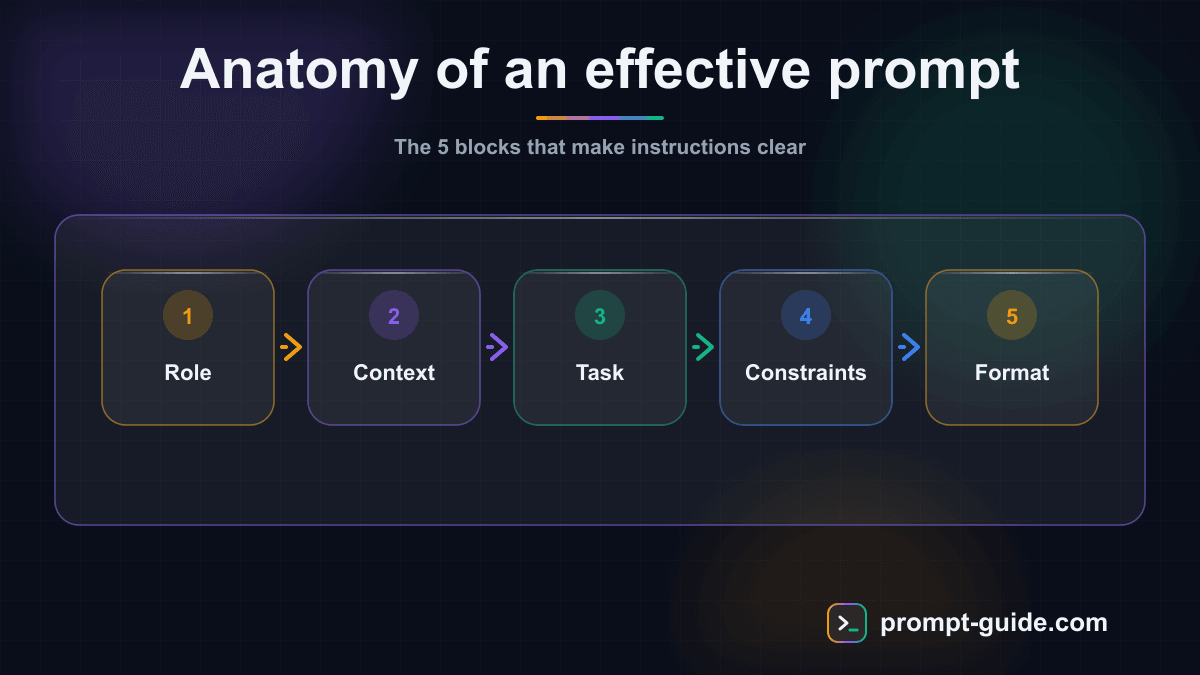
Here's the method we recommend for structuring each of your prompts. You can also use our prompt builder to apply this method automatically.
Step 1: Define the role
Start by giving ChatGPT a role. This steers the entire response toward the right level of expertise and tone.
Role examples:
- "You are a digital marketing expert with 15 years of experience"
- "You are a high school English teacher"
- "You are a senior Python developer specializing in data science"
The role frames the conversation and helps the AI draw from the right knowledge base.
Step 2: Provide context
Explain the situation. ChatGPT knows nothing about your project, your company, or your constraints. The more context you provide, the more relevant the response will be.
Include:
- Your overall objective
- Your target audience
- Specific constraints (budget, timeline, format)
- What you've already tried
Step 3: State the instruction clearly
Say exactly what you expect. Use precise action verbs: "write," "list," "compare," "analyze," "summarize," "create."
Avoid vague phrasing like "tell me about" or "say something about." Opt for direct, specific instructions instead.
Step 4: Specify the output format
Indicate how you want to receive the response:
- Bullet points or table
- Word count or paragraph count
- Structure with headings and subheadings
- Code with comments
- Email format, blog post, LinkedIn post
Step 5: Add constraints and examples
Constraints refine the result. Examples show the AI exactly the style or format you're looking for.
Constraint examples:
- "Maximum 200 words"
- "Professional but approachable tone"
- "Don't use technical jargon"
- "Include data-driven insights"
10 before/after examples to transform your prompts
Here are 10 common situations where a reworked prompt completely changes the quality of the response. Practice these techniques with our interactive exercises.
Example 1: Writing an email
Before (vague prompt):
"Write a professional email."
After (optimized prompt):
"You are a professional communication assistant. Write a follow-up email to a client who hasn't responded to our quote sent 10 days ago. The tone should be polite but assertive. The email should be no more than 150 words. Include a catchy subject line and a clear call-to-action to schedule a call this week."
Example 2: Creating marketing content
Before:
"Write a LinkedIn post."
After:
"You are a copywriter specializing in personal branding on LinkedIn. Write a 200-word post about 'the 3 mistakes entrepreneurs make when delegating to AI.' The tone should be conversational and engaging. Start with a punchy hook (a question or a statistic). End with a call for engagement (open question). Use emojis sparingly."
Example 3: Summarizing a document
Before:
"Summarize this text."
After:
"Summarize this text in 5 key bullet points. Each point should be one sentence maximum. Focus on actionable insights and hard data. Skip the introduction and conclusion sections."
Example 4: Preparing for an interview
Before:
"Help me with a job interview."
After:
"You are a recruitment coach. I have an interview for a Digital Project Manager position at a web agency. I have 3 years of project management experience. Generate 10 likely questions the interviewer might ask, with a 2-3 sentence response strategy for each using the STAR method (Situation, Task, Action, Result)."
Example 5: Analyzing data
Before:
"Analyze these numbers."
After:
"You are a financial analyst. Here are the Q1 2026 sales figures: [data]. Analyze this data by identifying: (1) the 3 main trends, (2) anomalies or red flags, (3) 2 actionable recommendations for Q2. Present the results as a table followed by a summary paragraph."
Example 6: Generating ideas
Before:
"Give me some content ideas."
After:
"You are a content strategist specializing in B2B SaaS. My company sells a project management tool. Our audience: project managers and PMOs at mid-sized companies (50-500 employees). Generate 15 SEO-optimized blog post ideas, grouped by search intent (informational, navigational, transactional). For each idea, provide the title, target keyword, and recommended format."
Example 7: Writing code
Before:
"Write a JavaScript function."
After:
"You are a senior JavaScript/TypeScript developer. Write a function that validates a signup form with these fields: email, password (min 8 characters, 1 uppercase, 1 number), password confirmation. The function should return an object with errors per field. Write in TypeScript with strict types. Add JSDoc comments and 3 test cases."
Example 8: Translating content
Before:
"Translate this text into French."
After:
"Translate this text from English to American English. Keep the informal tone and cultural references (adapt them to the American context if needed). Digital marketing technical terms should stay in English. Format: translated text followed by a note on important translation choices."
Example 9: Planning a project
Before:
"Help me plan my project."
After:
"You are a senior PMP-certified project manager. I'm launching an e-commerce site for artisanal products. Budget: $5,000. Timeline: 3 months. Team: myself + 1 freelance developer. Create a detailed reverse timeline with: major phases, milestones, deliverables, and identified risks. Table format with columns: Week, Task, Owner, Deliverable, Status."
Example 10: Proofreading and improving text
Before:
"Fix this text."
After:
"You are a professional writer and editor. Proofread this text addressing: (1) spelling and grammar errors, (2) awkward phrasing, (3) clarity of overly long sentences. Keep the author's style and tone. Present the corrected text, then list the 5 most important changes with a brief explanation for each."
The 7 most common mistakes to avoid
Even with the right method, certain habits can sabotage your prompts. Check out our complete guide to common prompting mistakes to go further.
Mistake 1: Being too vague
"Tell me about marketing" will never produce a good result. Always specify the topic, angle, and target audience.
Mistake 2: Asking for too much at once
A prompt asking to "write a complete business plan with market analysis, financial projections, and marketing strategy" is too ambitious. Break it down into several successive prompts.
Mistake 3: Forgetting the output format
If you don't specify the format, ChatGPT chooses for you — and it's not always what you need.
Mistake 4: Not iterating
The first result is rarely perfect. Use follow-up prompts to refine: "This is good, but make the tone more casual" or "Add concrete examples for point 3."
Mistake 5: Ignoring the conversation context
ChatGPT remembers the current exchange. Take advantage of this to build progressively rather than cramming everything into a single prompt.
Mistake 6: Using negations instead of positive instructions
Rather than "don't write long sentences," write "use sentences of 20 words maximum." Positive instructions are better understood.
Mistake 7: Not providing examples
When you want a specific style or format, show an example. "Few-shot prompting" (providing examples in the prompt) is one of the most powerful techniques to get exactly what you want.
Advanced tips for even better prompts
Once you've mastered the basics, here are advanced techniques to level up.
Chain-of-thought
Ask ChatGPT to reason step by step: "Think step by step before answering." This technique significantly improves responses on complex problems: calculations, logic, multi-criteria analysis.
Deep role-play
Beyond a simple role, give it a personality, constraints, and motivations: "You are a startup marketing director who needs to convince a skeptical CEO to invest in content marketing. You're pragmatic, ROI-focused, and communicate with data."
Meta-prompts
Ask ChatGPT to help you write better prompts: "I want to achieve [result]. What would be the ideal prompt I should write to get the best possible outcome?"
The audience persona technique
Specify not only who ChatGPT "is," but also who it's writing for: "Write for an audience of beginner freelancers who have zero knowledge of accounting." This automatically adjusts the vocabulary and level of detail.
Structured iterative prompting
Structure your conversation in phases:
- Phase 1: "First, ask me 5 questions to understand my needs"
- Phase 2: "Now, suggest 3 different approaches"
- Phase 3: "Develop approach 2 in detail"
Your perfect prompt checklist
Before sending your next prompt, check these points:
- Role: Have you defined who ChatGPT is in this context?
- Context: Does the AI have all the information it needs?
- Instruction: Is your request specific with an action verb?
- Format: Have you specified how you want the response?
- Constraints: Are there limits or conditions to follow?
- Example: Would an example help clarify your expectations?
To apply this checklist automatically, try our interactive prompt builder that guides you through each step.
Conclusion: practice makes perfect
Writing a good ChatGPT prompt isn't an innate talent — it's a skill that develops with practice. The 5-step method (role, context, instruction, format, constraints) works for 90% of use cases.
The most important thing: never stop at the first result. Prompting is a dialogue. Refine, clarify, iterate. It's in the back-and-forth exchanges that the magic of AI reveals itself.
Ready to put it into practice? Test your new skills with our interactive prompting exercises or explore our complete ChatGPT guide to discover even more techniques.
Once you've got the structure down, the fastest way to keep improving is to learn from proven examples: our prompt library gathers ready-to-adapt templates you can tailor to your own ChatGPT use cases.

L'Art du Prompting
Founder of Prompt Guide and CEO of Webpulser. Digital and AI entrepreneur since 2006, he shares his field-tested prompt engineering techniques.
Practice what you learned
Interactive exercises to sharpen your prompting skills
Stay Updated
Get our best articles and techniques every week.
Related Prompts
Write a SKILL.md for Hermes Agent: turn a repetitive task into a skill
Converts a freely described manual task into a structured SKILL.md for Hermes Agent: triggers, preconditions, procedure, checks, failure cases, report.
Create Math Exercises Adapted to Your Students Level
A comprehensive prompt to generate progressive math exercises with detailed answer keys, adapted to the grade level and chosen topic.
Résumer un cours pour réviser efficacement avec l'IA
Un prompt qui transforme n'importe quel cours ou ensemble de notes en fiche de révision structurée, claire et facile à mémoriser, adaptée à votre niveau et à votre échéance.
Create an Immersive Educational Role-Playing Game for Students
This prompt generates a turnkey educational role-playing game with scenario, character sheets, rules, resources and teacher guide adapted to your subject and level.