MCP (Model Context Protocol): The Complete Guide 2026
If you use Claude or another AI daily, you know this frustration: you copy a snippet from Notion, paste it in the chat, ask your question, copy the answer, switch back to Notion. Every time. For every tool. MCP (Model Context Protocol) eliminates this ping-pong. It's a standard protocol that lets any AI read and write directly in your tools — Notion, Slack, GitHub, your database — without you having to copy-paste anything.
Note: MCP was created by Anthropic in late 2024 and became a de facto standard in 2025. OpenAI, Google and most AI vendors comply with it or are working on it. Understanding MCP in 2026 means understanding how AIs will integrate into your entire stack over the next 5 years.
Why MCP is a game-changer
Before MCP, each AI had its own way to connect to external tools. ChatGPT had its "plugins," Claude had "connectors," Gemini had "extensions." Three incompatible proprietary systems. If you wrote a Notion integration for ChatGPT, you had to redo everything for Claude. For 100 tools × 5 AIs, that was 500 integrations to maintain.
MCP flips this model. You write a MCP server for your tool once (or install the existing one), and all compatible AIs can use it. Build a MCP server for your DB? Claude, Cursor, Codex, Aider, Continue — they all connect. That's the network effect that makes MCP inevitable.
Pro use case: connecting Claude to your CRM
You use HubSpot or Pipedrive as your CRM. Before MCP: you export leads as CSV, upload to Claude, ask your question, Claude answers but on data frozen at export time. With a HubSpot MCP server: you ask "how many open deals this month and which ones stalled more than 14 days," Claude queries HubSpot live, gives you the fresh answer, and can even update the relevant records if you ask.
Personal use case: your assistant talking to your Notion
You keep your personal organization in Notion (notes, tasks, journal). With the Notion MCP server: you ask Claude "summarize my notes from this week and propose 3 priorities for Monday," it reads your workspace live, makes the synthesis, and can create the new planning page without you opening Notion.
What is MCP, exactly?
MCP (Model Context Protocol) is a standardized communication protocol between an AI (the client) and an external tool (the server). It defines three things:
- How the AI discovers the tool's capabilities ("what can you do?")
- How the AI calls these capabilities ("read file X," "add row Y," "create page Z")
- How the tool returns results (text, structured data, errors)
The most accurate analogy: MCP is USB for AI. Before USB, every printer, keyboard, mouse had its own proprietary cable. With USB, any peripheral works with any computer. MCP does the same for software tools and AIs.
Who uses MCP in 2026?
- Claude (Anthropic) — protocol creator, native support across all surfaces (claude.ai, desktop app, Claude Code)
- Cursor and Windsurf — AI editors, integrated MCP support to plug in third-party tools
- Continue, Aider, Cline — CLI / open-source tools, all MCP-compatible
- OpenAI and Google — gradual adoption in 2025-2026, still partial
How it works: architecture in 30 seconds
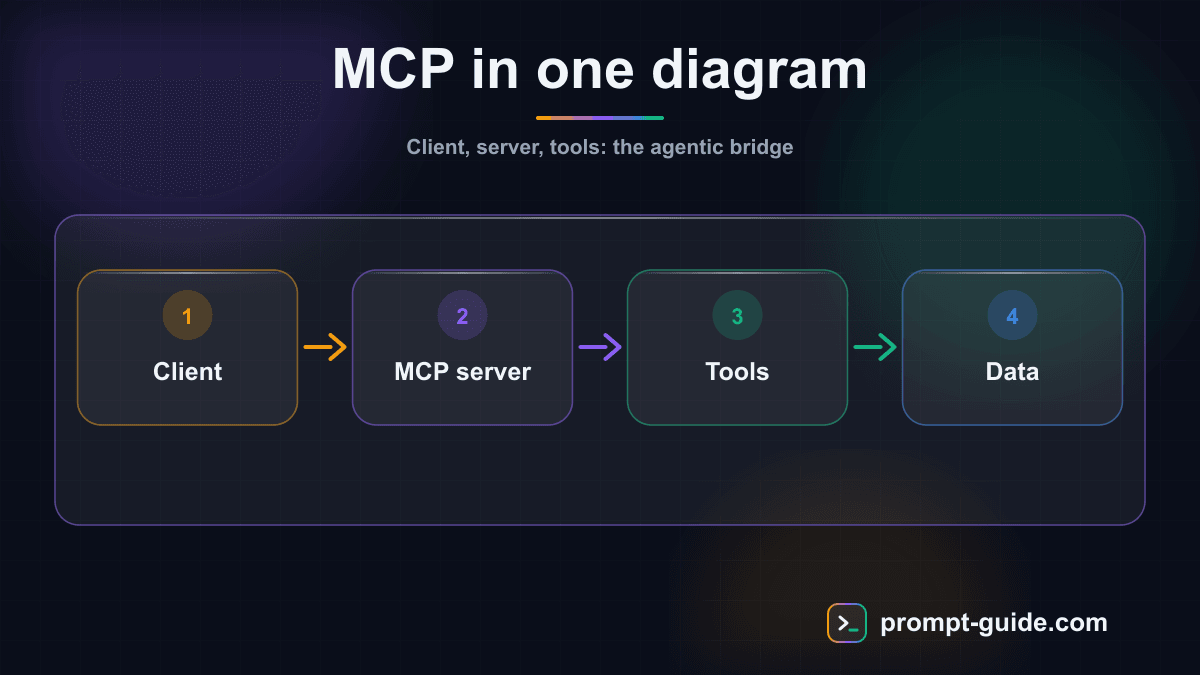
Three actors interact in a MCP setup:
The MCP client
— the AI (Claude, Cursor, etc.). It sends requests to the server.
The MCP server
— the program exposing a tool (a Notion MCP server, a PostgreSQL MCP server, etc.). It listens to requests, executes them, returns responses.
The underlying tool
— Notion, your DB, your CRM, your filesystem. The MCP server is the intermediary between the AI and the tool.
Communication uses a simple JSON-RPC-based protocol. You don't need to know the details: if you use an existing MCP server, everything is transparent. If you build your own, Anthropic's docs offer SDKs in TypeScript, Python, Rust, and Go.
Install your first MCP server in 5 minutes
The fastest way to understand MCP is to use it. Here are three useful MCP servers you can install today.
1. MCP filesystem (official Anthropic)
This MCP server gives Claude read / write access to a specific folder on your disk. Ideal for tasks on projects you don't want to put directly in Claude Code.
Then add it to your Claude config (~/.claude/config.json or via the desktop app):
2. MCP GitHub
Gives Claude read access to issues, PRs, commits, and the ability to create them. Indispensable for code review workflows, issue triage, release notes generation.
You'll need a GitHub personal access token with repo and issues scopes.
3. MCP PostgreSQL
Read-only access to your database. Ask Claude "how many users signed up this week and what's their D7 retention rate," it writes the SQL query, executes it, gives you the answer.
Tip: start with a read-only MCP server (filesystem in read-only, postgres in read-only). It gives you 80% of the value with no risk. You'll enable writes later, once you're comfortable.
Essential MCP servers in 2026
The MCP ecosystem grows every month. Here are the most useful servers to know in 2026, sorted by use case.
Personal productivity
- Notion — page and database read / write
- Google Drive — search in your Docs, Sheets, Slides
- Linear / Asana — ticket and project management
- Obsidian — access to your Markdown vault
Communication and CRM
- Slack — channel search, thread reading, message sending
- Gmail — email search, drafts, send (with confirmation)
- HubSpot / Pipedrive — pipeline read, record updates
Development
- GitHub / GitLab — issues, PRs, commits
- Sentry — production error retrieval
- Playwright — browser automation
- PostgreSQL / MySQL / SQLite — DB access
Web and data
- Tavily / Perplexity — web search with citations
- Crawlee — page scraping with JS rendering
- Brave Search — private web search
5 concrete use cases to set up this week
Theory is fine, here are 5 MCP workflows you can deploy in the next 7 days, by complexity.
Case 1: automated competitor monitoring
Plug in MCP Brave Search or Tavily. Configure a daily script asking Claude: "Search news from the last 24 hours about [3 competitors], identify product announcements, summarize in 5 bullet points, drop in this Notion page." MCP Notion closes the loop. 5 minutes with your morning coffee instead of 1 hour of manual monitoring.
Case 2: Monday morning briefing
Combine MCP Linear + MCP Slack + MCP Calendar. Sunday evening, ask Claude: "List my open tickets, unread DMs on Slack, and Monday-Tuesday meetings with context." Open your machine Monday, the brief is ready.
Case 3: GitHub issue auto-response
MCP GitHub + CI script. On every new issue, Claude reads title + body, identifies whether it's a bug, feature request, or question, applies the right label, posts a first comment response. You validate or correct.
Case 4: multi-source investment memo
MCP web search + MCP filesystem + MCP Notion. For each company to analyze, Claude searches recent news, reads downloaded docs in a folder, cross-references your Notion knowledge base, generates the 4-page memo. A 1-hour task in 5 minutes.
Case 5: PR review agent
MCP GitHub + MCP PostgreSQL (for context). On every new PR, Claude reads the diff, checks consistency with your DB schema, identifies potential regressions, writes a review comment. You come back, read, merge (or not).
MCP vs Function Calling vs Plugins
Three mechanisms coexist to connect AI to tools. Here's how to tell them apart.
Function calling (the oldest)
Invented by OpenAI in late 2023, function calling lets a dev expose Python / JS functions to a model, which decides when to call them. It's powerful but proprietary to each vendor, and lives in your application code. MCP is a layer above: a MCP server exposes its capabilities via function calling under the hood, but the standard is shared across all AIs.
Plugins (stillborn)
ChatGPT plugins launched in 2023 were abandoned in 2024 (replaced by Custom GPTs and Actions). They were a precursor to MCP but proprietary and closed. MCP wins because it's open and cross-vendor.
Custom GPTs and Gemini Gems (proprietary equivalents)
These are wrappers of prompts + tools, accessible only on their vendor. MCP is complementary: you can create a Custom GPT that calls MCP servers (via Actions) or a Claude Skill using them.
Security and MCP limits
MCP gives the AI direct access to your tools. It's powerful, but requires real security hygiene.
Security best practices
- Prefer read-only to start — for 80% of use cases, reading is enough. Only enable writes on servers where you need it.
- Minimal scope tokens — for MCP GitHub, only grant
reposcopes (notadmin). For MCP Notion, share only a dedicated workspace, not your whole account. - Human validation for critical actions — deleting a file, sending an email, modifying a customer record: always ask the human for confirmation.
- Audit trail — log MCP requests so you can trace who did what (the AI acts in your name, but you're responsible).
Current limits
- Latency — every MCP call is a round-trip. On 50-call workflows, it adds up. Prefer MCP servers supporting batch.
- Evolving standards — the MCP spec still has potential breaking changes. Check server compatibility on updates.
- Heterogeneous documentation — community MCP servers vary in quality. Prefer official ones (Anthropic, or vendors themselves: Notion, Linear, etc.).
Going further
MCP fits into a broader ecosystem of tools and protocols. To understand competing and complementary approaches:
- Custom GPTs (OpenAI) — the proprietary OpenAI equivalent, which can call MCP servers via Actions
- Gemini Gems (Google) — the Google equivalent, natively integrated with Workspace
- Claude Skills — the workflow layer that orchestrates MCP calls
- Claude Code — the CLI agent that heavily consumes MCP servers
- Agentic AI — the general paradigm in which MCP plays a key role
Frequently Asked Questions
Is MCP an open protocol?
Yes, fully. The spec is published under MIT license, SDKs are open-source, and anyone can create a MCP server. Anthropic initiated the project but doesn't control it as proprietary.
Do I need to be a developer to use MCP?
Not necessarily. To install an existing MCP server, just copy-paste a command in your terminal. To create your own MCP server, code is required (TypeScript or Python recommended).
Does MCP work with ChatGPT?
Partially in 2026. OpenAI announced MCP support in 2025, but implementation remains limited vs Claude. For now, the most complete MCP experience is on Claude (claude.ai, desktop app, Claude Code).
What's the cost of using a MCP server?
The MCP server itself is generally free (open-source). Costs come from the underlying API: if you use a MCP server calling OpenAI's API or a paid third-party API, you pay that API. The local filesystem or PostgreSQL MCP server is 100% free.
Does MCP replace Claude Skills?
No, they're complementary. A Skill is a named workflow that orchestrates actions. A MCP server is a connection to an external tool. A Skill can use multiple MCP servers in its workflow.
Does my data go through Anthropic servers?
For local MCP servers (filesystem, local postgres), no: everything stays on your machine. For MCP servers connected to cloud APIs (Notion, GitHub, etc.), data flows through those APIs as usual. Difference vs manual copy-paste: it's the AI that passes the request, not you.
Can I create a private MCP server for my company?
Yes, it's even a major use case. A bank, a law firm, a data team can create their own internal MCP servers on proprietary systems, without that data ever leaving their perimeter. The spec and SDKs are open-source.
Related Prompts
System prompt of an autonomous AI agent: identity, tools and guardrails
Generates a complete, portable system prompt for a tool-using AI agent: mission, scope, per-tool rules, three autonomy levels, security, doubt handling, report format.
Write a project's CLAUDE.md: the brief Claude Code reads at every session
Turns your project description into a dense CLAUDE.md: commands, structure, conventions, pitfalls, off-limits areas and situations where the agent must ask before acting.
AGENTS.md for OpenClaw: operating rules and security guardrails
Writes a complete AGENTS.md for OpenClaw: work loop, per-channel routing, three action levels, sensitive data, prompt-injection defence, heartbeat and log.
Practice Exercises
Related guides
Continue your learning
You've finished this guide. Here's how to go further.
Practice what you learned
Interactive exercises to sharpen your prompting skills
Get new guides every week
Join our newsletter and never miss new content.